

Adobe Creative Cloud 2025: How to Master the Latest AI Features Transforming Creative Work
If you have ever searched for what is the best AI image editor on the market right now - the answer has consistently pointed to Adobe Creative Cloud. In 2025, Adobe has dramatically raised the bar, rolling out a wave of AI-powered capabilities that make it not just the best AI photo editor, but the most complete creative platform across image, video and design workflows.
From photographers and graphic designers to video producers and social media marketers across India, Adobe Creative Cloud is redefining what it means to create - faster, smarter and at a quality level that helps you win bigger, more premium projects.
This guide breaks down every major new AI feature in Adobe Creative Cloud - including the landmark integration of next-generation partner AI models from Google, OpenAI, Runway and more into Adobe Firefly, Boards and Photoshop Desktop and shows you exactly how to use them to transform your creative output.
What Is Adobe Creative Cloud - And Why It's the Industry Standard
Adobe Creative Cloud is a subscription-based suite of over 20 professional creative applications spanning photography, graphic design, video editing, UX design, digital illustration, social media and document management. It is the industry-standard tool for creative professionals across the globe - used by freelancers, agencies, film studios and Fortune 500 companies alike.
The Creative Cloud All Apps plan bundles flagship applications including:
- Adobe Photoshop - The world's leading AI photo editor and image manipulation platform
- Adobe Illustrator - Vector design for logos, icons and print
- Adobe Premiere Pro - Professional video editing with AI-powered tools
- Adobe After Effects - Visual effects and motion graphics
- Adobe InDesign - Page layout for print and digital publishing
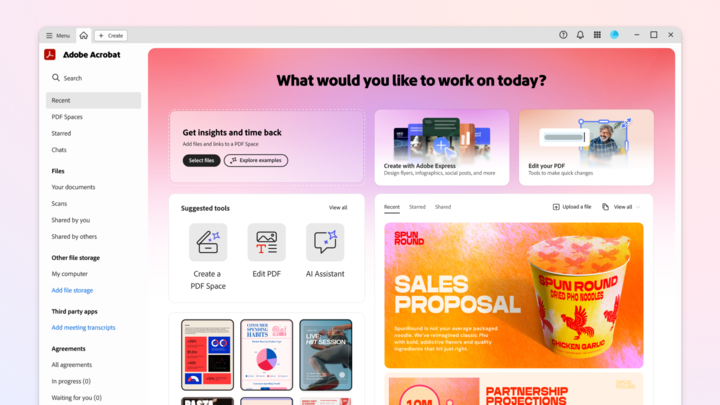
- Adobe Acrobat Pro - PDF creation, editing and e-signatures
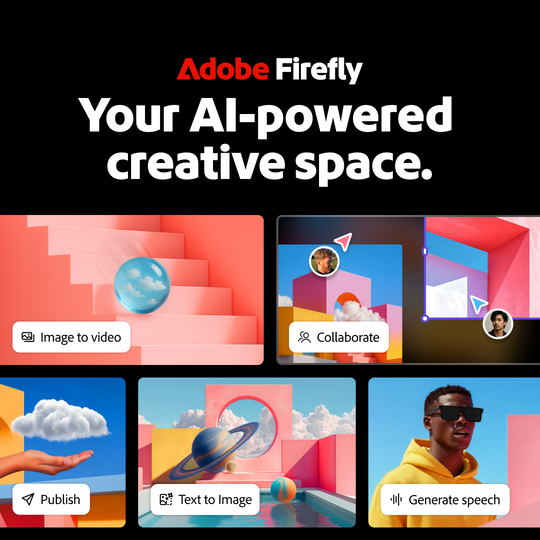
- Adobe Firefly - Adobe's generative AI model for images and video
- Adobe Express - Fast social media content creation
Subscribers also get access to Adobe Fonts (thousands of typefaces), 100 GB of cloud storage, Adobe Portfolio, Behance integration, real-time collaboration tools and thousands of templates, all under one subscription.

Adobe's Biggest AI Update of 2025: Next-Generation Partner AI Models
The most significant announcement from Adobe this year is the deep integration of next-generation partner AI models from Google, OpenAI, Runway and more across three core Creative Cloud products. This integration delivers unprecedented photorealism, stylistic range and prompt accuracy in all generative outputs.
| Product | What The Latest partner AI Model Do |
| Adobe Firefly | Powers text-to-image generation with vastly improved photorealism, stylistic range and natural language prompt refinement. Now the most capable AI image generator in the Creative Cloud. |
| Adobe Boards | Generate AI concept images directly within collaborative moodboarding canvases. Teams can produce multiple style variations, apply AI colour suggestions and annotate - all in one shared workspace. |
| Photoshop Desktop | Enhances Generative Fill, Generative Expand and Remove Tool with deeper contextual understanding, improved lighting coherence and texture continuity for more natural AI-assisted edits. |
What the Latest AI Models Change in Firefly
Firefly's image generation backend now produces outputs with far greater photorealism and stylistic range. Whether generating product mockups, editorial illustrations or background scenes for video, Firefly delivers outputs that rival anything achievable through standalone AI tools. The interface also supports conversational prompt refinement allowing users to iterate using natural language rather than technical parameters.
What the Latest AI Models Change in Photoshop Desktop
The integration supercharges Photoshop's Generative Fill, Generative Expand and Remove Tool with dramatically improved context awareness and texture continuity. The model better understands complex scenes, lighting conditions and material surfaces - meaning AI-assisted edits look more natural and more professional than ever before.
What Are All the Features with an AI Image Editor? A Complete Breakdown
For anyone wondering what are all the features with an AI image editor, Adobe Creative Cloud delivers a comprehensive set of capabilities covering every stage of the creative workflow. Here is the full picture:
- Generative Fill & Generative Expand - Select any area of an image, type a text prompt and Photoshop fills it with AI-generated content that matches the surrounding perspective, lighting and texture. Generative Expand extends your canvas in any direction, adding believable background content seamlessly. With the latest partner AI models now powering these features, results are significantly more photorealistic and context-aware.
- One-Click Background Removal & Subject Selection - Adobe Sensei drives one-click background removal and Object Aware Selection, which identifies complex subjects - including hair, fur and semi-transparent materials - with pixel-level accuracy. This is essential for teams seeking the best AI photo editor for ecommerce images, enabling consistent product shots at scale without manual masking.
- Neural Filters - Photoshop's Neural Filters apply complex transformations with a single slider: skin smoothing, photo colorisation, Super Zoom upscaling, JPEG artefact removal, style transfer and more. These represent the core of how AI photo retouching works at commercial scale - enabling professional-grade portrait retouching in seconds rather than hours.
- Firefly Text-to-Image Generation - Integrated directly into Photoshop, Illustrator and Adobe Express, Firefly lets you generate images from text prompts and insert them into your workflow. Generated images can also be animated using Adobe's AI video generator features in Premiere Pro - acting as a seamless image to video AI pipeline.
- Content-Aware Fill & Healing - Adobe's long-standing Content-Aware Fill has been significantly enhanced with AI - enabling seamless removal of unwanted objects, people or elements from photographs. The Remove Tool automatically reconstructs the background with intelligent pixel analysis, making complex object removal a one-step process.
- Premiere Pro AI Editing Suite - Premiere Pro includes Speech to Text for automatic captioning, Auto Reframe for multi-platform reformatting, AI scene cut detection, Enhanced Speech for audio restoration and Generative Extend for filling clip gaps with AI-interpolated frames. These make Premiere Pro the leading AI video generator for marketing professionals who need fast, multi-format deliverables.
How Does AI Image Editing Differ from Traditional Editing Tools?
Understanding how AI image editing differs from traditional editing tools is crucial for any creative professional evaluating their workflow in 2025. The differences are significant:
| Traditional Editing | AI- Powered Editing (Adobe CC) |
| Manual masking takes hours per image | One-click subject selection & masking with pixel precision |
| Background replacement requires complex layer compositing | Text-prompt background replacement in seconds |
| Skin retouching demands specialist multi-step techniques | Neural Filter retouching via a single slider |
| Cannot create content that was not photographed | Generative Fill creates entirely new visual content on demand |
| Consistency across large batches is manual and slow | Batch AI processing for ecommerce at scale |
| High skill barrier - years of training required | Accessible to professionals and beginners alike |
For ecommerce teams, Adobe Photoshop is widely recognised as the best AI photo editor for ecommerce images. Its ability to generate consistent white or lifestyle backgrounds, remove imperfections and batch-process thousands of product images at speed is unmatched in the industry.
How Does AI Photo Retouching Work?
The question of how does AI photo retouching work is one that many photographers and designers ask. In Adobe Photoshop, the process works across three distinct layers of intelligence:
Layer 1: Detection
Adobe Sensei first analyses the image to identify subjects, skin tones, facial landmarks, lighting direction and texture types. This detection layer informs all subsequent editing decisions made by the AI.
Layer 2: Intelligent Modification
Neural Filters apply targeted modifications based on the detected information. For portrait retouching, this means skin smoothing that respects natural pores and texture, teeth whitening calibrated to realistic tones and eye enhancement that preserves natural depth and reflections.
Layer 3: Contextual Generation
Unlike traditional retouching which can only modify existing pixels, AI generation can create entirely new content. Generative Fill can replace a plain studio background with an on-location environment, extend a cropped portrait to include a full-length body, add or remove accessories or reconstruct partially obscured subjects.
Non-Destructive Workflow : All AI edits in Photoshop are applied as non-destructive layers, preserving the original image at all times. Every AI decision can be reversed, refined or regenerated at any stage of the process.
Best AI Video Generator for Marketing: Adobe Premiere Pro & Firefly
The question of what is the best tool to generate an AI video - or how do I create a video with AI - is one that marketing teams and content creators are asking with increasing urgency. For professionals in the Adobe ecosystem, the answer is Premiere Pro combined with After Effects and Firefly's AI video generator capabilities.
AI Text to Video: Firefly's Generative Video Model
Adobe Firefly now includes an AI text to video feature that generates short video clips directly from text prompts. Type a descriptive prompt - such as 'a creative professional designing on a tablet in a bright modern studio' - and Firefly's best AI video generator engine produces a realistic video clip ready for your Premiere Pro timeline.
This AI text to video capability is particularly valuable for marketing teams who need fast, cost-effective visual content without the overhead of a full video production. Combined with the AI image to video pipeline through Firefly, Adobe has positioned itself as a comprehensive AI video generator platform for creative professionals.
Why Adobe Creative Cloud: The Core Advantages
| Advantage | What It Means for You |
| Industry standard | Trusted by the world's leading designers, filmmakers and photographers - an industry-standard tool for creative professionals globally |
| Comprehensive Multi-App Workflow | Seamlessly move between Photoshop, Premiere, Illustrator and After Effects to create more efficiently and deliver the highest quality |
| AI-Driven Efficiency | Generative AI tools across every application cut editing time dramatically, enabling more projects and faster delivery at premium quality |
| Reliability & Cloud Protection | 100 GB of Adobe Cloud Storage protects your work from crashes and data losses - with auto-save, version history and cross-device sync |
| Value For Money | All 20+ Adobe Creative apps - Photoshop, Premiere Pro, Illustrator, After Effects and more - for just ₹1,499 per month |
Conclusion: The AI Creative Platform for India's Next-Generation Creators
Whether you are a photographer searching for what is the best AI photo editor, a marketer looking for the best AI video generator for your campaigns, a designer needing to create more efficiently or a brand team seeking the best AI photo editor for ecommerce images at scale - Adobe Creative Cloud in 2025 delivers a comprehensive AI-powered answer to all of these needs.
The integration of next-generation partner AI models from Google, OpenAI, Runway and more into Firefly, Boards and Photoshop Desktop represents Adobe's most significant AI leap yet - delivering generative images and video at a quality and speed not possible twelve months ago. Combined with Premiere Pro's AI tools, After Effects' motion AI, Firefly's AI text to video and AI image to video capabilities and the broader Creative Cloud multi-app workflow, Adobe has cemented its position as the most powerful and trusted creative platform in the world.
For creative professionals in India, at ₹1,499 per month for the All Apps plan, Adobe Creative Cloud is not just a tool - it is an investment in your creative career, your business competitiveness and your ability to deliver premium work that commands premium rates.
Disclaimer: This article is produced in partnership with Adobe. TechCircle editorial standards apply.
Next Article