

Adobe Creative Cloud in 2026 : A Connected Toolkit for Creators
For creators who need to make images, refine them and carry them into finished campaigns, Adobe Creative Cloud brings a range of creative tools into one subscription. Generative AI is part of that workflow: Adobe Firefly can create images from text prompts, while other Creative Cloud apps help users edit and adapt assets for different formats.
Adobe Firefly is a generative AI image and video generator for creators, available on the web and inside Creative Cloud apps, and its models are designed to be commercially safe – which makes it a strong answer to “What’s the best AI image generator for commercial use?”.
The suite may suit creators who work across social posts, video, presentations and campaign materials. Adobe’s Singles’ Day promotion in India includes discounted options for individual users, teams, and eligible students and teachers.
Adobe Creative Cloud Overview
Adobe Creative Cloud is a subscription offering that brings creative applications and services together. Depending on the plan, creators can use it to work across image editing, illustration, video, design and other creative tasks. Creative Cloud Pro is Adobe’s all-apps plan for creators, combining its creative apps with generative AI tools such as Firefly.
For an AI image workflow, Firefly can help generate visual starting points from a text prompt. Creators can then refine the result and adapt it for a specific use, such as a thumbnail, social post, mood board or campaign asset. The broader appeal of Creative Cloud is the ability to move between creation and editing tools as a project develops.
Where Firefly Fits Into the Workflow
How do I make an image from text with AI?
To make an image from text with AI in Firefly, open Generate Image, describe the subject, style and setting, choose an aspect ratio, and generate. Firefly’s Generate Image tool can return up to four image suggestions from a text prompt. Creators can guide results with settings such as style, colour, lighting, composition and aspect ratio. A reference image can also help communicate a visual direction.
Firefly also includes Generate Video, which creates short video clips from a text prompt or an image.
The first output is often a starting point. Editing tools can help users add or remove objects, change backgrounds and refine an image before it is used in a larger project. This can be useful when a creator needs to adapt one idea for different placements or campaign formats.
Is Adobe Firefly safe for commercial use?
Commercial use requires attention to the specific model and its terms. Adobe says images generated with its Firefly models are designed to be commercially safe, and that those models are trained on licensed content and public-domain material whose copyright has expired. Some Firefly-generated assets may include Content Credentials identifying the use of generative AI. Creators should still review rights, likenesses, trademarks and the applicable terms; Adobe says users are responsible for assessing outputs from partner models.
Reasons to Consider Creative Cloud Pro
A standalone image generator may be enough for occasional experiments. Creative Cloud Pro may be a better fit for people who regularly create and edit assets across several formats, or who already rely on multiple creative apps.
It can support a workflow that starts with an idea, uses generative tools to explore visual options, and continues through editing and production. Teams may also prefer a plan intended for collaborative creative work, while students and teachers can look at the dedicated Student and Teacher Edition offer.
Singles’ Day Offers in India
| Campaign | Validity(IST) | Offer |
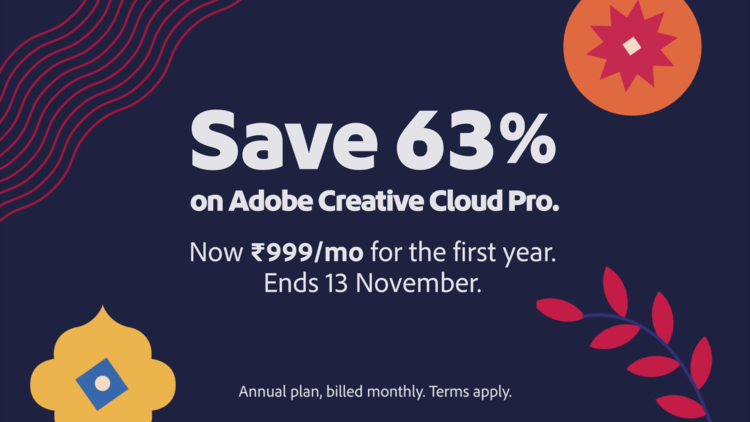
| Singles' Day | 2 November 2026 10:30 AM to 13 November 2026, 8:30 PM | ♦ Creative Cloud Pro Individual: 63% off at ₹999 per month for 12 months. |
The STE Pro promotion is intended for eligible students and teachers. The supplied offer details state the discount period and monthly prices; creators should check Adobe’s campaign terms for eligibility, billing and plan conditions.
Offer availability and prices can change, so confirm the current Creative Cloud Pro price on adobe.com/in before subscribing.
Creators Who May Find Creative Cloud Useful
Social and video creators: They can use generative tools to explore concepts, then refine assets for thumbnails, Reels and other campaign placements.
Freelancers and small businesses: They may value a connected set of creation and editing tools when producing recurring marketing materials. They should check the terms for the selected model and review each asset before commercial use.
Creative teams: They can compare the Teams offer with their collaboration and subscription needs.
Students and teachers: Those who meet the eligibility requirements can consider the STE Pro promotion at ₹199 per month for 12 months during the Singles’ Day campaign period.
Occasional users: They can first assess whether they need a full creative suite or would be better served by a narrower tool. A discounted subscription is most useful when the apps and features are likely to be part of regular work.
How to Get Better Results From an Image Prompt
Start with the image’s purpose, then describe the subject, setting, style, lighting and composition. For example: “A ceramic coffee mug on a pale green desk, morning window light, close-up product photograph, open space on the right for headline text.”
Generate a few options, choose the strongest composition and refine it. If the result is close but not usable, change one instruction at a time. A reference image can help communicate a colour palette or composition, but only upload material you have the right to use.
Verdict
Adobe Creative Cloud is worth considering for creators who want to move from visual exploration to editing and production across a broader creative workflow. Firefly can contribute image ideas and edits within that process, while the wider suite can support work across formats.
For creators in India asking which AI image generator to use in 2026, Adobe Firefly within Creative Cloud Pro is a commercially safe option for generating images from text and then editing them in the same workflow. The Singles’ Day promotion offers lower prices for individual, team, and eligible student and teacher plans during the stated campaign window. Before subscribing, compare the offer with the apps you use and check the current terms for your plan.
Next Article